ChoirMate keeps deleted audio files in the trash bin for 30 days. During that time, you can restore a practice track or recording that was deleted by mistake.
Warning
The trash bin is only for audio files. Other deleted content does not appear here.
Restore an Audio File
- 1
Open your profile
Tap Menu, then tap your name or profile picture.
- 2
Open the trash bin
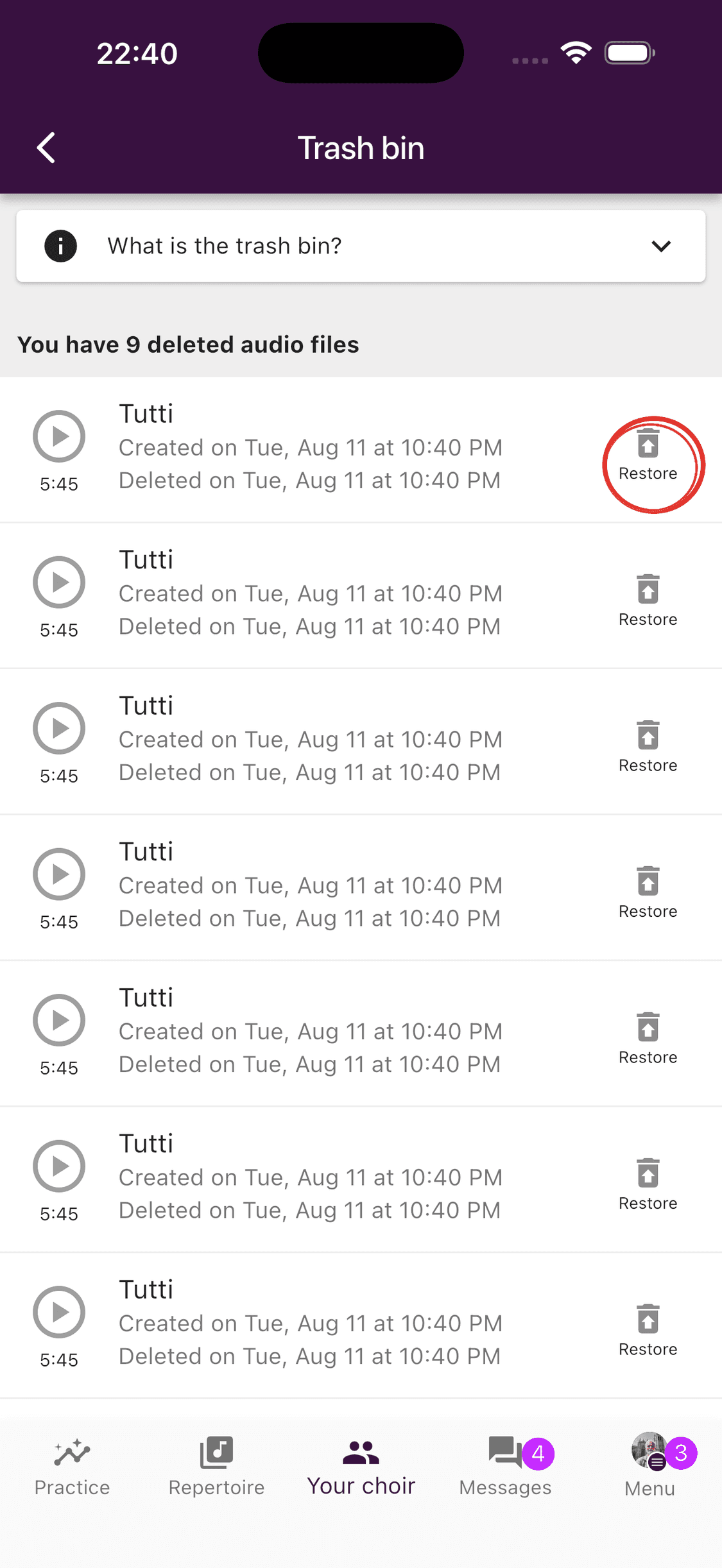
Tap Trash bin. If it is empty, there are no deleted audio files available to restore.
- 3
Restore the file
Find the audio file and tap Restore.
A restored file becomes private and is removed from its practice-list selections. Open the file settings if it should be shared with the choir or added to a practice list again.
Delete an Audio File Permanently
To remove an audio file before the 30 days have passed, swipe left on it in the trash bin and confirm the deletion.
Warning
Permanent deletion cannot be undone.
Content That Does Not Use the Trash Bin
Sheet music, documents, links, practice lists, events, posts, member profiles, and account deletion are not stored in this trash bin. Read the confirmation carefully before deleting other content.
If you deleted something other than audio by mistake, contact support@choirmate.com. Include the choir name, what was deleted, when it happened, and who deleted it. Recovery may not be possible, but these details help support investigate.