Multilingual publishing is part of the public choir website.
A single ChoirMate website can present the same choir in several languages. Visitors use the language picker in the header, and the website keeps them on the equivalent page when they switch.
See it in action on the ChoirTastic demo: English, Norsk, Deutsch, Íslenska, Nederlands, Dansk, Polski, and Svenska.
Ask ChoirMate to enable the languages
Tell ChoirMate which languages you want and which one should be the default. This is currently part of website provisioning and is not changed under Website Customization.
The available website languages are English, Norwegian Bokmål, Icelandic, German, Dutch, Danish, Polish, Swedish, and French. ChoirMate confirms the languages that are ready for your site before they are published.
Understand what is translated
ChoirMate provides translated interface text such as navigation, buttons, form labels, dates, and standard headings. Your choir supplies translations for its own content, including:
- choir name and descriptions
- Contact page introduction
- gallery alternative text and captions
- repertoire introduction, sample titles, artists, and descriptions
- highlighted-member roles and descriptions
- member quotes
- public event names, descriptions, and link labels
- privacy policy and legal notice
Photos, recordings, videos, dates, times, and most external links are normally shared across languages.
Enter a translation
- 1
Open a website editor
Open Website Customization, then choose the content area you want to translate.
- 2
Choose a language
Select the language code below a supported text field, for example EN, NB, or DE. The field label shows the language you are editing.
- 3
Write and save
Enter the translated text and save the page. Repeat for every public field that matters in that language.
Translate a custom event section name
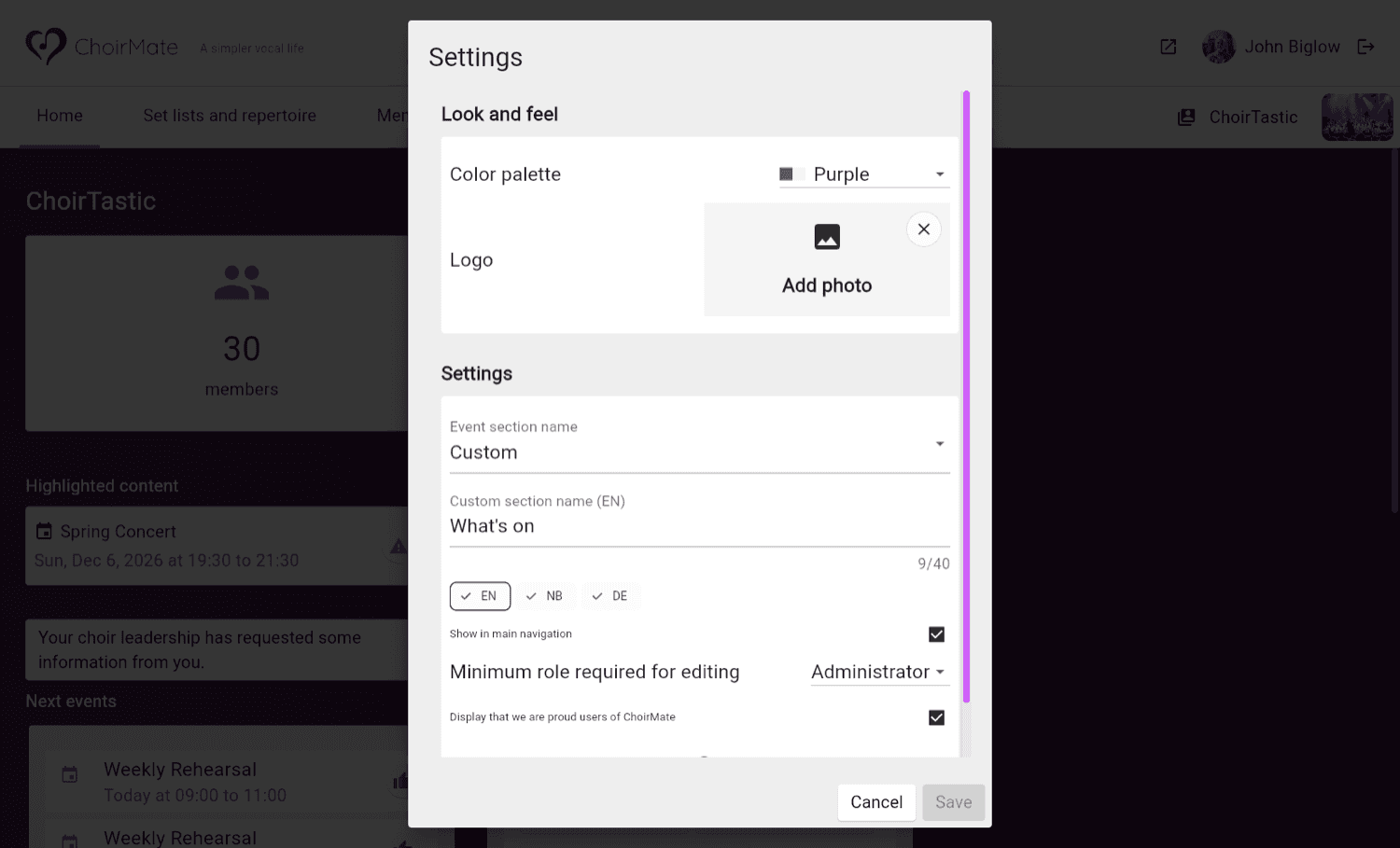
Under Website Customization > Settings, the Events and Concerts options use ChoirMate's automatic interface translations. You do not need to translate these standard names yourself.
Choose Custom under Event section name to use your own wording. Enter Custom section name in the website's default language, then select the language codes below the field to add translations. For example, use “What's on” in English, “Dette skjer” in Norwegian, and “Aktuelles” in German. Keep each name short, with no more than 40 characters.
The website uses the translated name in the main menu, tab, and section heading. If a translation is missing or blank, all three use the custom name from the website's default language. Show in main navigation controls the menu link separately.
Switching to Events or Concerts keeps your custom translations, so you can return to Custom later.
Know how fallback works
If a translated field is empty, visitors see the value from the website's default language. This prevents an incomplete page, but it can also create a page that mixes languages.
Tip
Before announcing a new language, open that version of the public site and check the front page, About, Members, Gallery, Repertoire, Events, Contact, privacy policy, and legal notice.
Use one consistent translation for the choir name, voice parts, membership wording, and contact instructions. Translate for clarity rather than copying word for word.