
Wat is er nieuw in ChoirMate
Bekijk de nieuwste functies en verbeteringen
Betere gesprekken, overzichtelijkere bestanden
Zoek berichten terug, deel bestanden en antwoord met context. En organiseer de bestanden van je koor voortaan makkelijker.
ChoirMate 10.5.0 brengt vernieuwde Berichten en maakt het makkelijker om je bestanden te organiseren.
Houd het gesprek bij elkaar
Zoek eerdere berichten terug, deel PDF's, documenten en spreadsheets, citeer een bericht als je antwoordt en gebruik @vermeldingen om duidelijk te maken wie je bedoelt.

Zet bestanden op de juiste plek
Selecteer meerdere bestanden in de bestandsopslag en verplaats ze in één keer.
Vind je balans met de Sporenmixer
Speel de partijen van je koor samen af, stel elke stem apart in en oefen met solo en dempen. Beschikbaar met Premium.
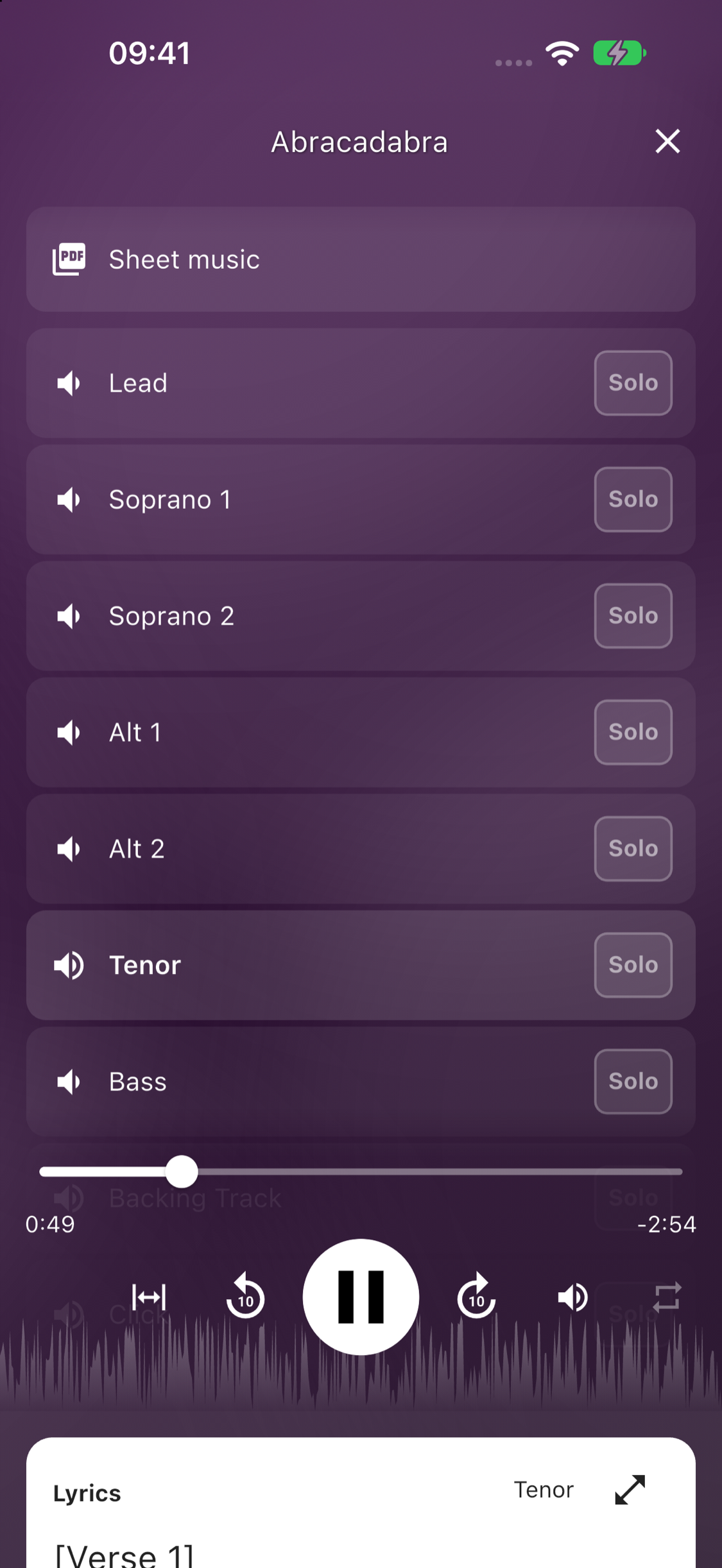
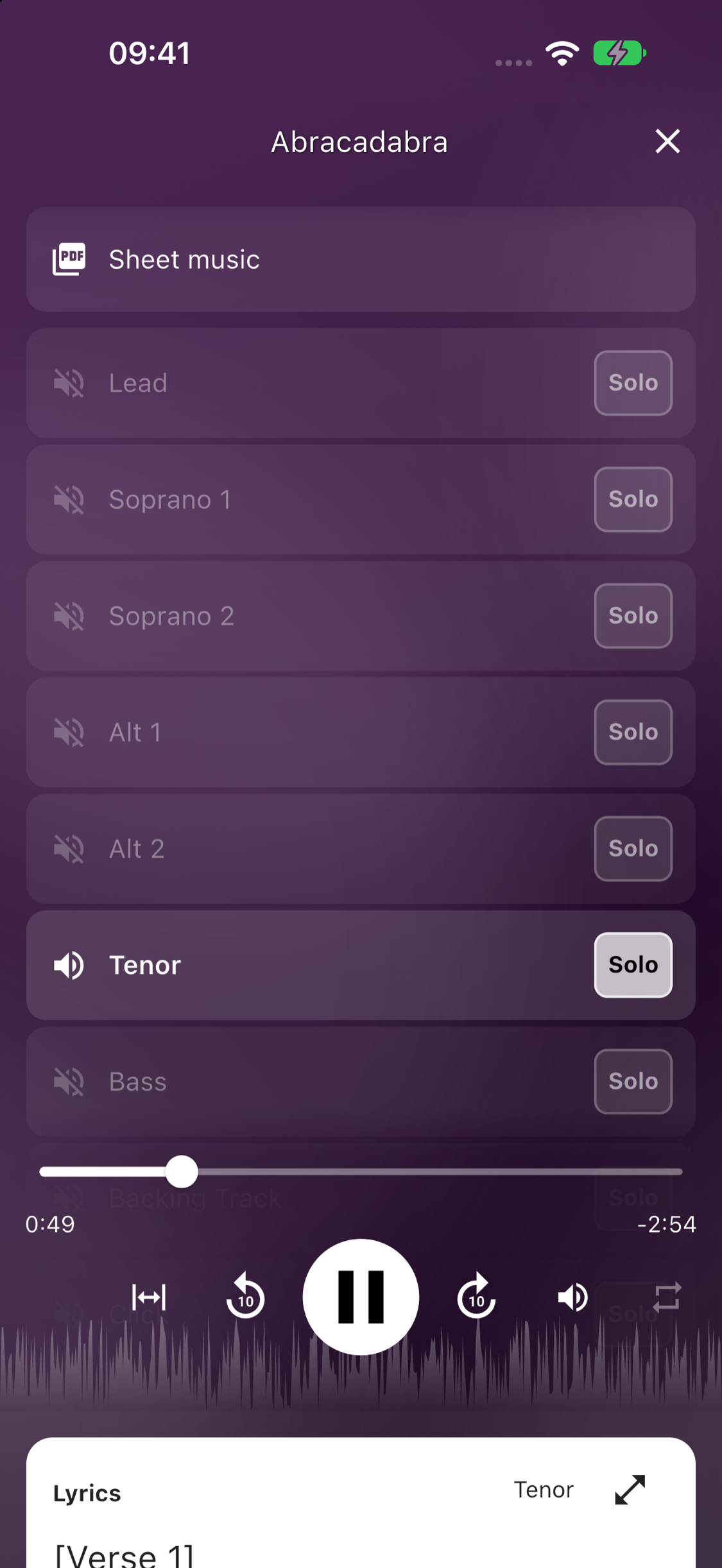
De Sporenmixer is nu standaard beschikbaar voor liederen in je repertoire. Luister naar de afzonderlijke stempartijen tegelijk, pas het volume per partij aan, zet een partij op solo om hem in te studeren, of demp hem en zing zelf mee met de anderen.
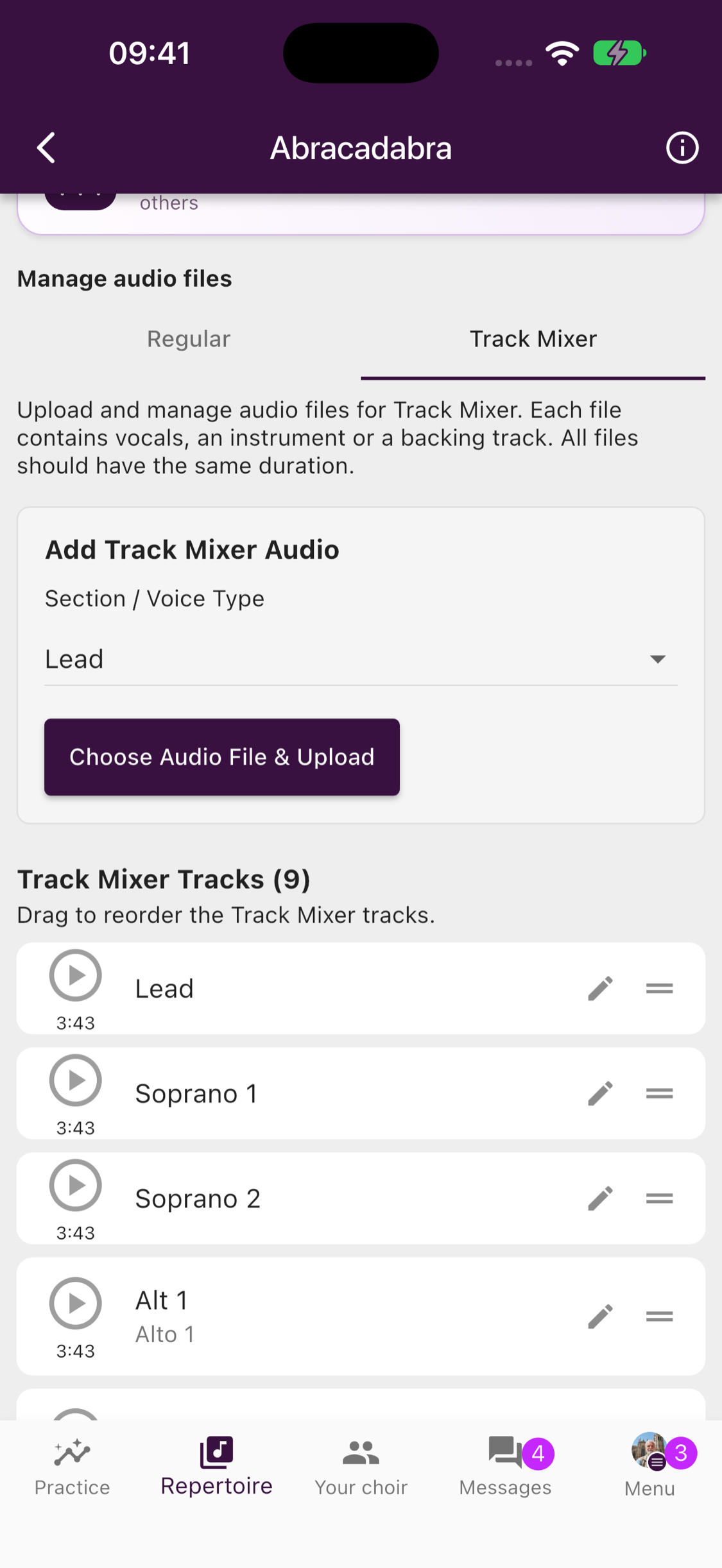
Repertoirebeheerders kunnen mixerbestanden toevoegen en ordenen via het tabblad ‘Sporenmixer’, naast ‘Normaal’ voor de gewone audiobestanden. Gebruik opnamen met dezelfde duur en hetzelfde startpunt.
Beschikbaar met een Premium-groepsabonnement, een actieve Premium-proefperiode of een individueel Premium-abonnement. Leden kunnen luisteren; voor het beheren van gedeelde bestanden zijn daarnaast repertoirerechten nodig.
Expressievere bladmuziek en slimmere repetities
Voeg crescendo's toe aan bladmuziek, blader sneller door pagina's, plan repetities makkelijker en zie de verjaardagen van koorleden in de agenda.
Expressievere bladmuziek
Voeg aanpasbare muzikale tekens toe, zoals crescendo's en decrescendo's, en rek ze op tot ze precies over de passage lopen. Nieuwe snelkoppelingen naar pagina's en een verbeterde navigatie met de stylus maken het bovendien makkelijker om door je muziek te werken.
Repetities sneller plannen
Beheer geplande liederen direct terwijl je een repetitie bewerkt. De verbeterde tabletweergave houdt je planning en repertoire bij elkaar, en ChoirMate kan locaties voorstellen die je koor vaak gebruikt.
Verjaardagen van koorleden in de agenda
Verjaardagen die leden willen delen, staan nu in de agenda. Zo kan iedereen de mensen vieren die samen het koor maken.
ChoirMate in het Japans
ChoirMate is nu ook beschikbaar in het Japans.
Put Names to Faces
Meet your choir through quick Who's Who photo rounds, and optionally add pronouns to your own profile.
Meet Your Choir with Who's Who
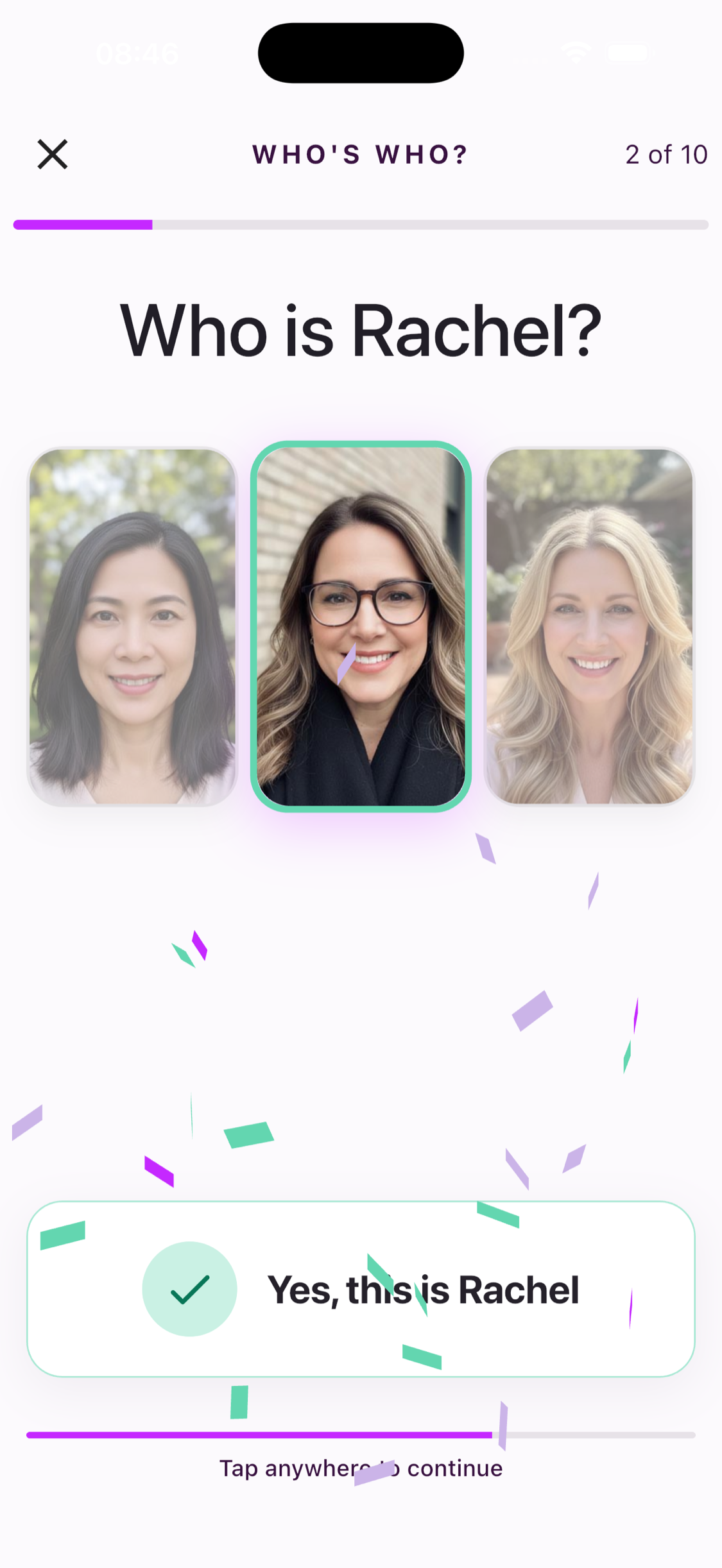
Who's Who turns profile photos from members of your choir into quick ten-question name challenges. Start a round and choose which of three people matches the name.
Everyone in a ready choir can open the game and see the three real choices. Selecting an answer requires an active individual subscription, a choir subscription, or a free trial.
Read seven fun ways to remember names →
Pronouns, If You Want Them
You can now optionally add pronouns to your own profile. Choose a suggested option, enter your own, or leave the field unset. When added, your pronouns can appear alongside your profile, including in Who's Who.
Jouw bladmuziek, jouw markeringen
Een volledig nieuwe bladmuziekweergave met persoonlijke annotaties, snellere paginawissels, flexibele lay-outs en snel wisselen tussen liederen.
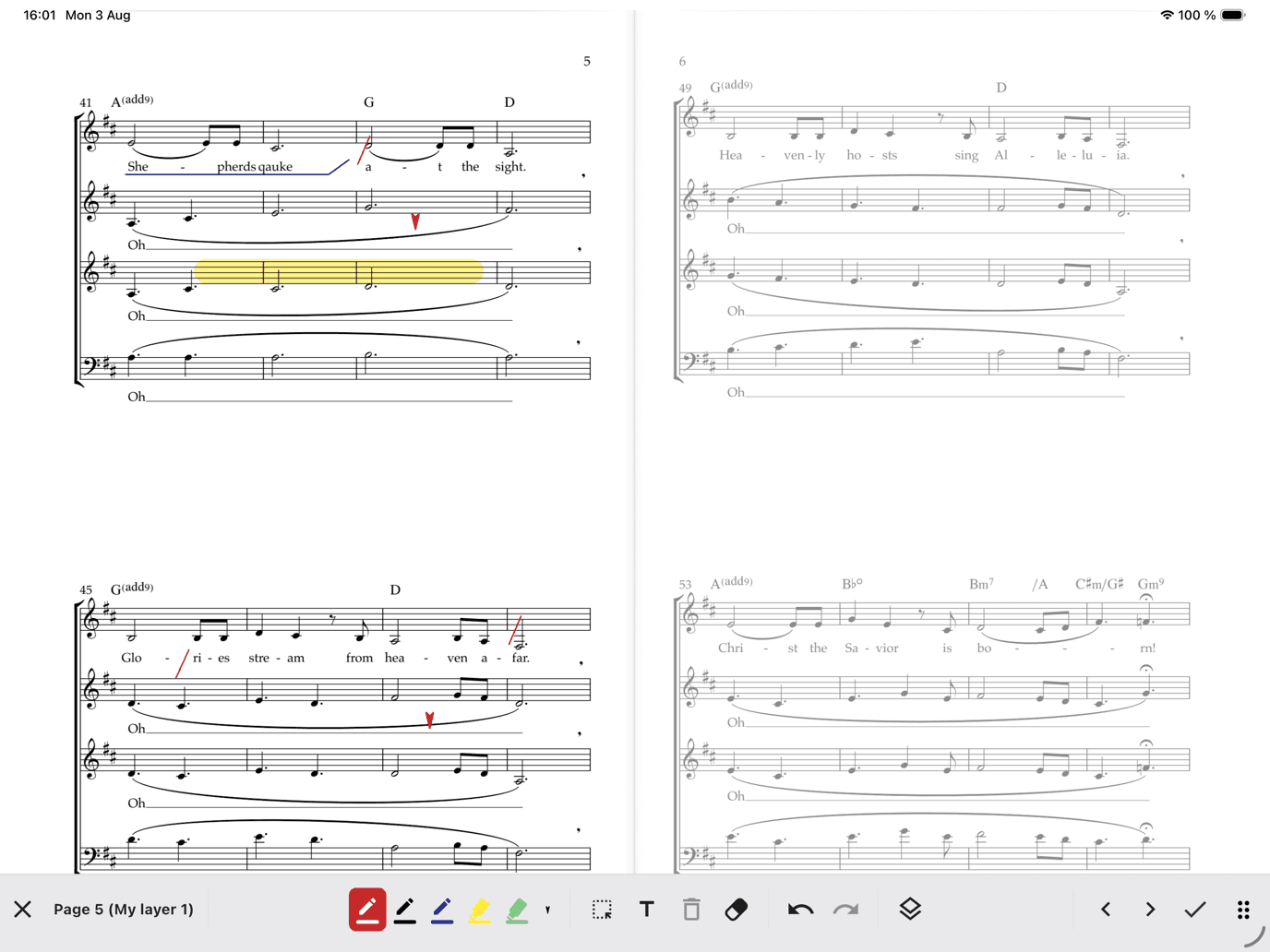
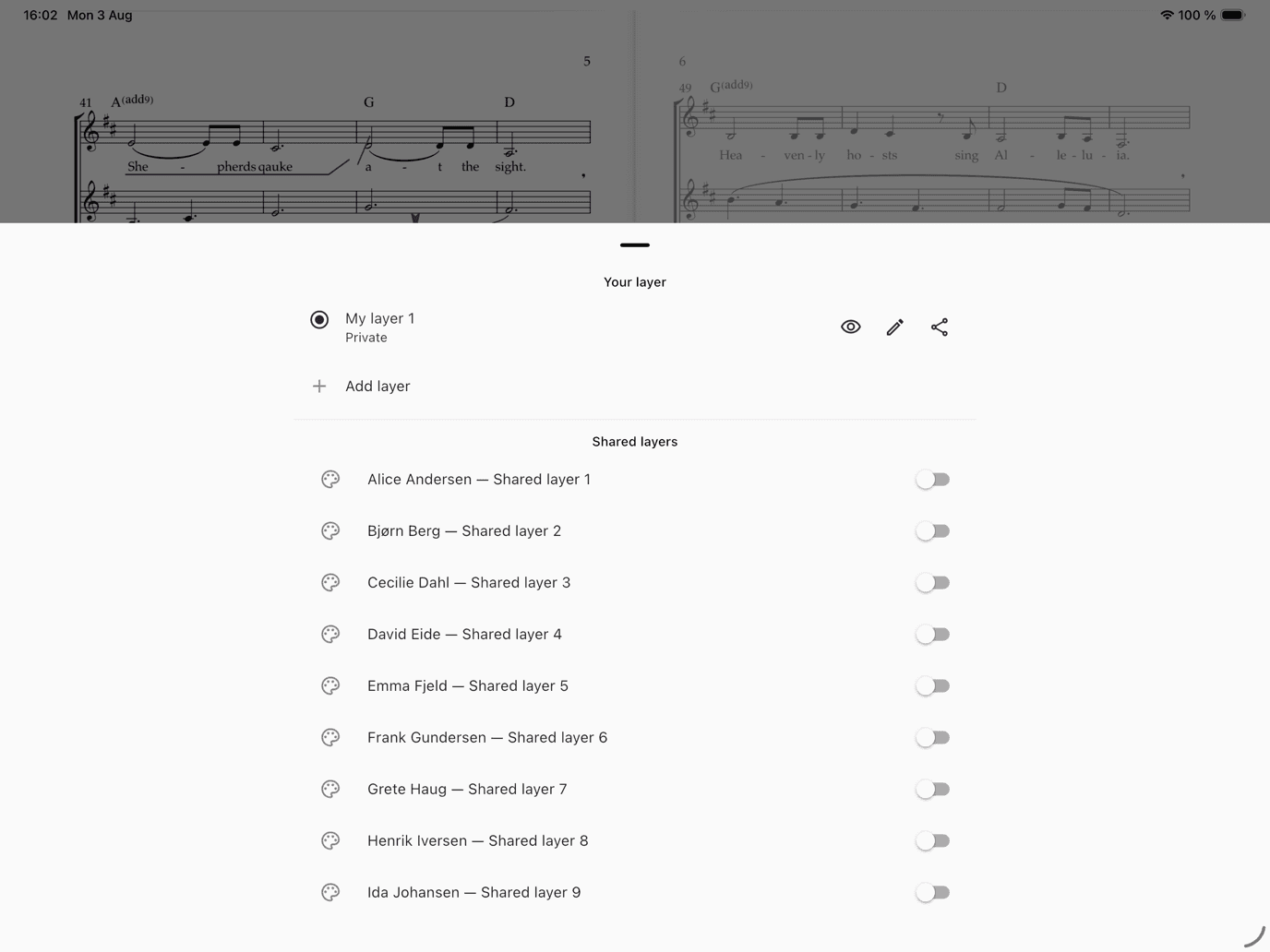
ChoirMate 10 is onze grootste bladmuziekupdate tot nu toe. De nieuwe weergave is gemaakt voor repetities, thuis oefenen en het podium – en je eigen aantekeningen blijven eindelijk gewoon op de partituur staan.
Een weergave gemaakt voor zangers
Blader soepel door de pagina's, spring snel naar een pagina met de paginaschuifbalk, kies voor één of twee pagina's naast elkaar en wissel tussen liederen in je repertoirelijsten of bibliotheek zonder de weergave te sluiten. Audio, piano, liedtekst en notities blijven binnen handbereik, terwijl de partituur centraal blijft staan.
Annoteer je eigen partij
Markeer ademhalingen, omcirkel inzetten, laat dynamiek opvallen, schrijf tekst of plaats muzieksymbolen direct op de partituur. Kies pennen en markeerstiften, pas kleur en dikte aan, selecteer en verplaats markeringen, gum uit, maak ongedaan en voer opnieuw uit.
Je persoonlijke laag is standaard privé en gaat met je mee op al je apparaten. Je kunt extra lagen maken voor verschillende repetities of doeleinden, en dirigenten en koorleiding met de juiste rechten kunnen een laag delen met het hele koor, een stemgroep of geselecteerde zangers.
Gratis tijdens de introductie, daarna Premium
Tijdens de introductieperiode zijn annotaties gratis voor iedereen. Daarna is het opslaan van annotaties inbegrepen bij een individueel Premium-abonnement of een Premium-groepsabonnement. Je bestaande markeringen blijven veilig bewaard als je toegang afloopt en verschijnen weer zodra Premium wordt geactiveerd. Iedereen kan de annotatiehulpmiddelen ook nog steeds uitproberen in een korte demo, waarin niets wordt opgeslagen.
Zo maak je aantekeningen in je bladmuziek →
Ook nieuw in ChoirMate 10
- PDF-bladmuziek importeren die vanuit andere apps is gedeeld
- Sneller wisselen tussen recente liederen en de liedbibliotheek
- Betrouwbaarder offline opslaan van annotaties en export van PDF's met annotaties
Promote Your Concerts
Turn any event into a public, shareable concert page with photos, venue info, and ticket links. Plus meet-up times, emergency contacts, and smarter multi-day events.
Version 9.38.0 is about the practical details that make choir life run smoother — led by a brand-new way to fill the seats at your next concert. And while this update focuses on the smaller things, some of the biggest features we have ever built are taking shape behind the scenes. More on that soon.
Public Event Pages
Choir Admins can now turn any event into a beautiful public web page — no choir website required. Add a hero image and a photo gallery, show the venue with a map link, and add ticket links or a "Tickets at the door" badge. Concert runs with several performances are fully supported, each with its own time and, if you need it, its own ticket link.
Publishing takes a minute: open an event of type Concert or Hired performance — those are the types that show the Publish event banner — review the page, which is mostly prefilled from the event, and publish. Then share the link on WhatsApp, SMS, email, or anywhere else, straight from the share screen.

The page updates whenever you edit it, and you can unpublish it at any time. Public event pages are available for groups with a Standard or Premium subscription, or during an active trial.
For a full walkthrough, see the event promotion guide.
Meet-Up Time on Events
Need everyone in place before the downbeat? Events can now carry a separate meet-up time ahead of the official start. Members see both times on the event, so "meet 18:30, start 19:00" no longer has to live in a message thread.
Emergency Contacts
You can now add emergency contacts to your profile — name, phone number, and how they are related to you. If something happens at a rehearsal, a concert, or on tour, the right person can be reached quickly.
Multi-Day Events Stay Visible
Seminar weekends and tours no longer vanish from the upcoming list after day one. Ongoing events now stay visible until they actually end.
That is version 9.38.0. Meanwhile, we are deep into some of the most ambitious features ChoirMate has ever seen — watch this space.
Audio Editor
Trim, split, and delete sections of your audio files right inside the app. The new Audio Editor gives you precise editing with undo support.
Edit Audio Without Leaving the App
The new Audio Editor lets you trim, split, and clean up audio files directly in ChoirMate. No more switching to a separate app to cut out silence at the start or split a long recording into individual songs.

Three Editing Modes
Trim removes everything outside your selection. Drag the handles to mark the section you want to keep, then tap Trim to selection.
Split divides a recording into two parts at the playhead position. Place the playhead where you want the cut, and tap Split here. Both parts are saved as separate files.
Delete removes a selected section and keeps the rest. Useful for cutting out a cough, a break, or a false start in the middle of a take.

Zoom and Undo
Pinch to zoom in for precise edits. Pan left and right to navigate through longer recordings. Every edit can be undone, so you can experiment without worry.
Generated Files
Each edit produces new files that appear below the editor. You can preview them, rename them, or delete ones you do not need before saving. When you save, the files are added to your repertoire.

Premium Feature
The Audio Editor is available with a Premium subscription. Open a song in your repertoire, tap the menu, and select Trim to get started.
Apple Watch & Wear OS
Record your entire choir without leaving your spot. ChoirMate is now on your wrist with Remote Recording Mode, song browsing, and lyrics.
Record Your Choir From Your Wrist
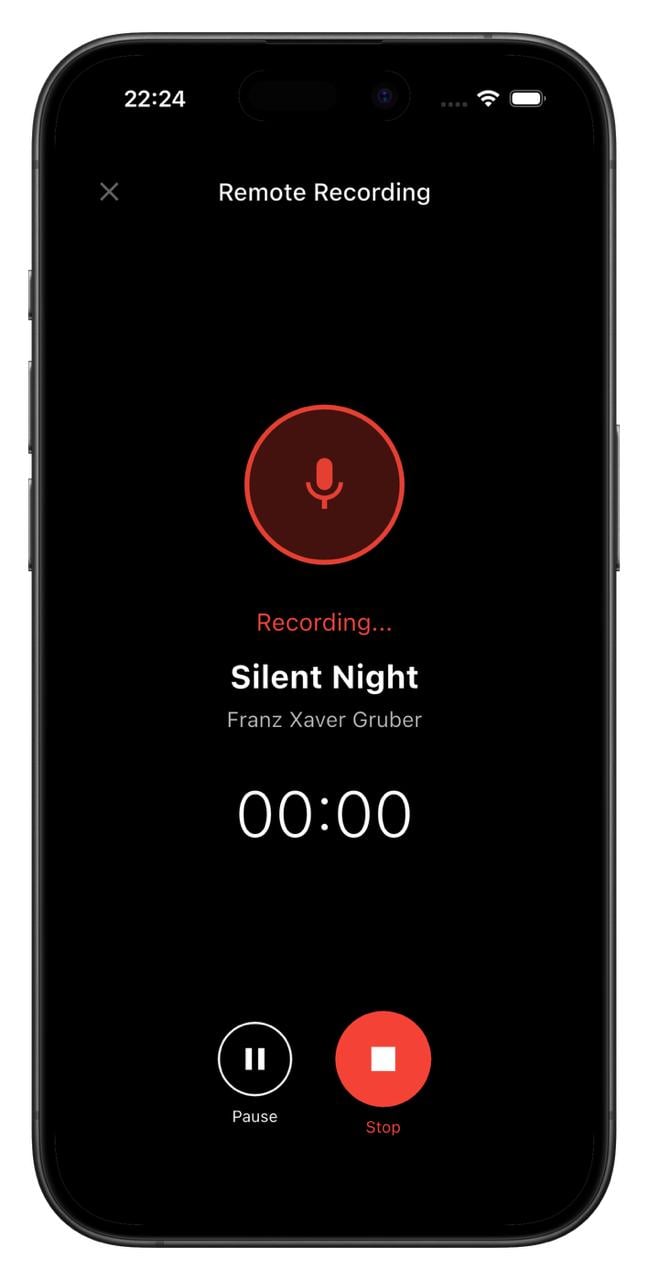
ChoirMate is now available on Apple Watch and Wear OS. The headline feature: Remote Recording Mode lets you turn your phone into a standalone microphone and control the entire recording from your watch.

Remote Recording Mode
Place your phone in the middle of the rehearsal room, walk back to your spot, and start recording from your watch. Pause, resume, or stop whenever you need to. The recording saves directly to the song in your repertoire.
No more running back and forth to press record. You stay with the singers where you belong.
Browse Songs & Read Lyrics
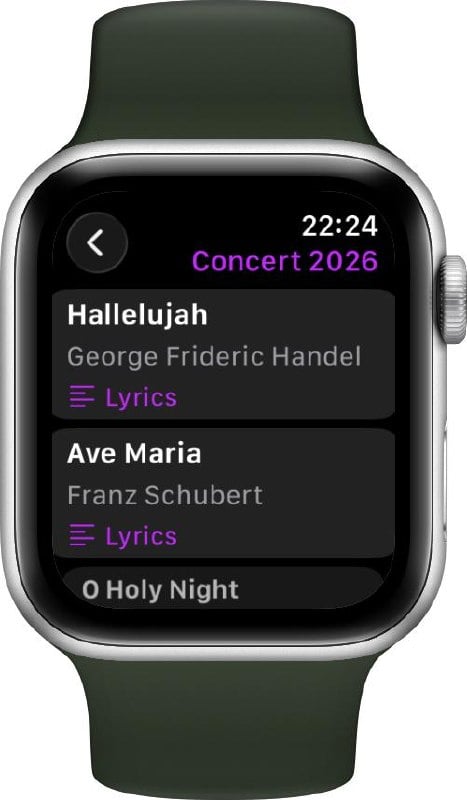
Your watch gives you quick access to your choir's setlists and songs. Tap into any setlist to see the songs, and open a song to read lyrics right on your wrist. Handy for a quick check before going on stage.
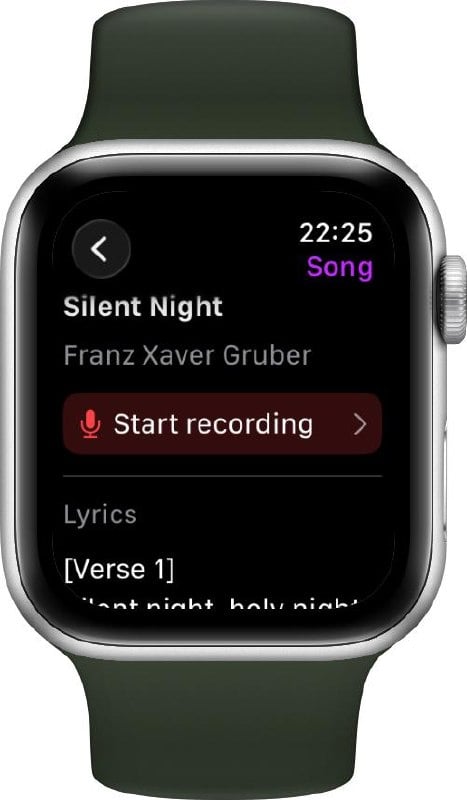
Getting Started
To use ChoirMate on your watch:
- Apple Watch: Open the Watch app on your iPhone, scroll to ChoirMate, and tap Install.
- Wear OS: Download the ChoirMate Wear app from Google Play.
Once installed, the watch connects automatically to ChoirMate on your phone.
Premium
Remote Recording Mode and viewing lyrics on the watch are Premium features. Browsing songs and setlists is available for everyone.
For a full walkthrough, see the smartwatch guide.
Requirements
- Apple Watch: watchOS 10 or later
- Wear OS: Wear OS 4 or later
Personal Lyrics & Event Cancellation
Add your own lyrics to any song for personal reference, and Choir Admins can now cancel and reactivate events with automatic member notifications.
Your Own Lyrics
You can now add your own personal lyrics to any song in the repertoire. Whether you want to jot down phonetic notes, write out translations, or keep your own version of the text, your lyrics are stored privately and only visible to you.
Switch between the choir's official lyrics and your personal version at any time using the view mode toggle in the lyrics panel. Your personal lyrics are also included when generating a PDF of the song.
Adding your own lyrics is available for Premium subscribers. Learn more about lyrics in ChoirMate →
Event Cancellation
Choir Admins can now cancel an event directly from the event management screen. When an event is cancelled, all relevant members are automatically notified, and the event title is updated to clearly show it has been cancelled.
Changed your mind? Cancelled events can be reactivated at any time, and members will be notified again.
Android Auto Integration
Practice your choir music on the go! ChoirMate now works with Android Auto, giving you full playback controls right from your car's dashboard.
We're bringing ChoirMate to Android Auto! If you're an Android user, you can now browse and play your choir's practice tracks, set lists, and audio files directly from your car's infotainment system.
Whether you're driving to rehearsal or just commuting, you can make the most of your time by listening to your parts. The Android Auto interface shows your current queue with song titles, and gives you play/pause, skip, and seek controls right on the dashboard.
Your Practice Lists, Right in the Car
With a ChoirMate Premium subscription, you can build personalized practice lists with exactly the tracks you need to work on. These practice lists are now available directly through Android Auto, so you can queue up your next rehearsal session before you even leave the driveway.
All the Same Features as CarPlay
The Android Auto integration includes the same features as the Apple CarPlay integration released in version 9.31.0:
- Browse set lists and practice lists from the car's display
- Repeat Part mode to loop tricky sections
- Fine-tune loops with ±5-second controls
- Automatic playback from song to song
- Repeat mode (off, repeat all, repeat one)
Event Attachments & PDF Downloads
Attach posts, calendar events, polls, or files directly to an event. Plus, PDFs shared in messages can now be downloaded.
Events can now have content attached to them. Attach posts from the choir leadership, calendar events, polls, or files from the Documents and Links library directly to an event, so your members have everything they need in one place.
Standard subscriptions can attach up to 3 items per event, while Premium allows up to 10.
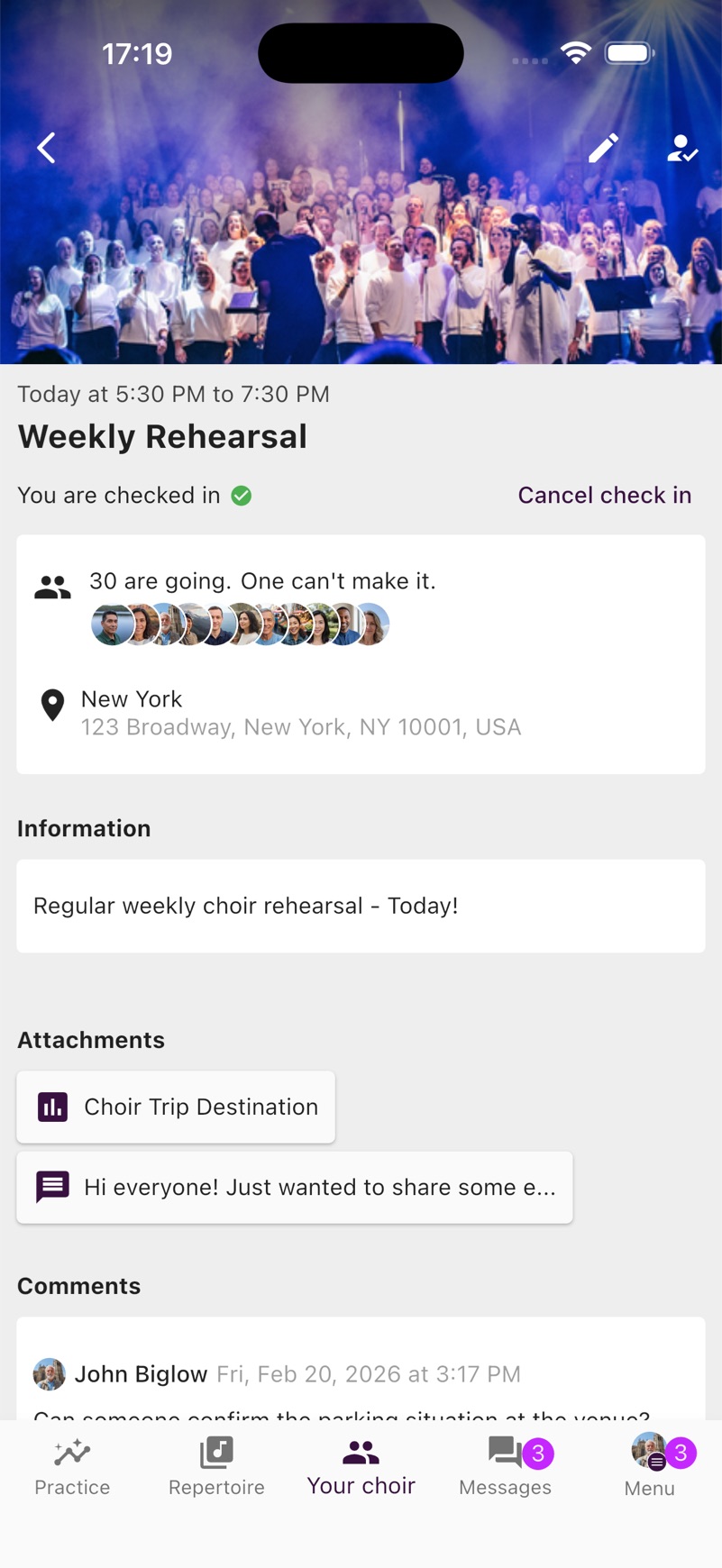
Additionally, PDFs shared in messages can now be downloaded and shared directly from the viewer, making it easy to save documents to your device.
This release also includes stability improvements to the Apple CarPlay integration.
Apple CarPlay Integration
Practice your choir music on the go! ChoirMate now works with Apple CarPlay, giving you full playback controls right from your car's dashboard.
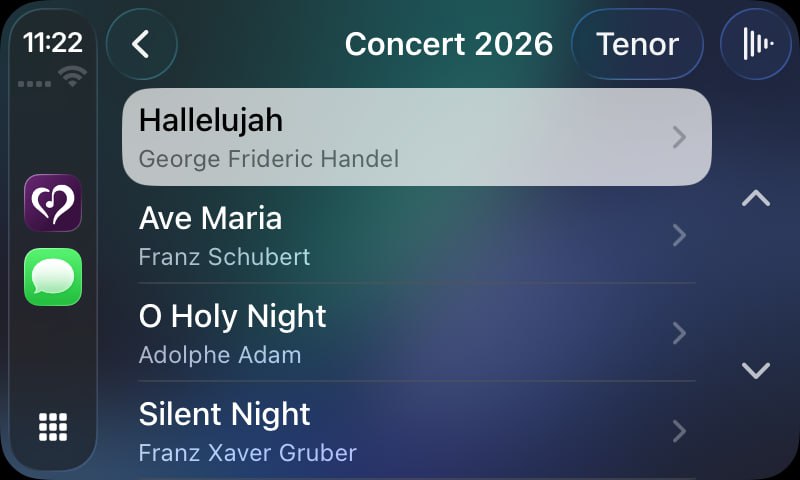
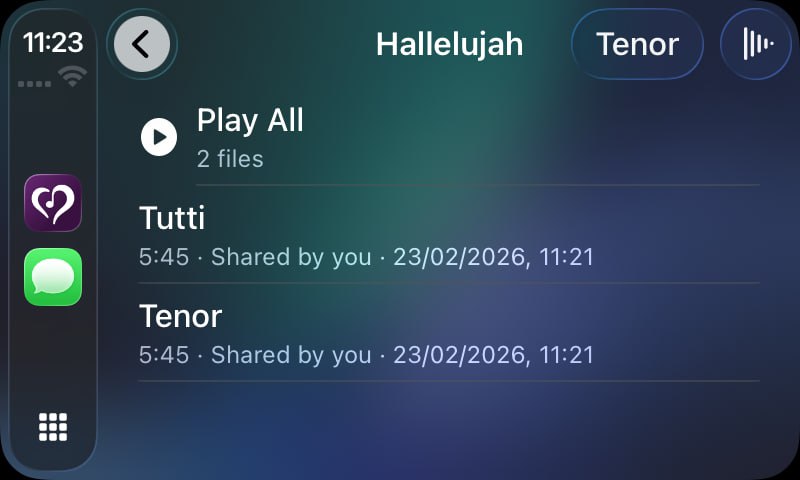
We're excited to bring ChoirMate to your car! With Apple CarPlay support, you can now browse and play your choir's practice tracks, set lists, and audio files directly from your car's infotainment system.
Whether you're driving to rehearsal or just commuting, you can make the most of your time by listening to your parts. The CarPlay interface shows your current queue with song titles, and gives you play/pause, skip, and seek controls right on the dashboard.
Repeat Part Mode on CarPlay
Need to nail that tricky section? The Repeat Part mode is fully available on CarPlay too. Loop any section of a track and listen to it over and over until it sticks, all without touching your phone.
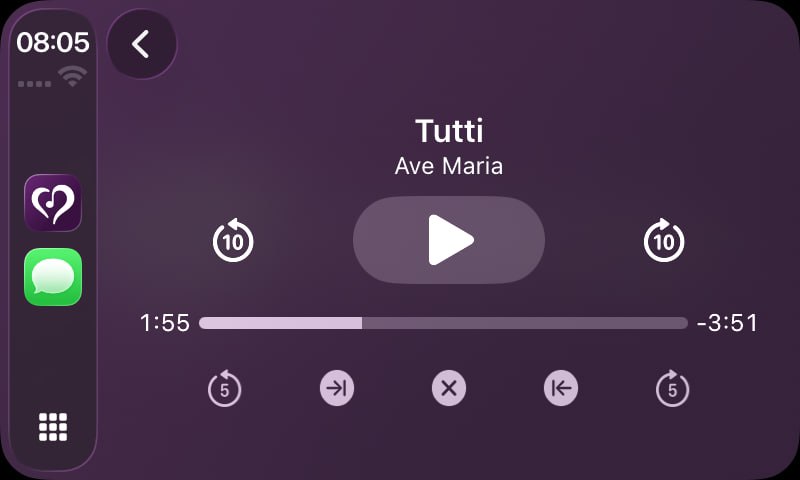
Your Practice Lists, Right in the Car
With a ChoirMate Premium subscription, you can build personalized practice lists with exactly the tracks you need to work on. These practice lists are now available directly through CarPlay, so you can queue up your next rehearsal session before you even leave the driveway.
Combined with the lock screen and Control Center integration, ChoirMate's audio player now works seamlessly across all your Apple devices and contexts.
Binnenkort meer...