
Vad är nytt i ChoirMate
Se de senaste funktionerna och förbättringarna
Mer uttrycksfulla noter och smartare repetitionsplanering
Lägg till crescendon i noterna, navigera snabbare mellan sidor, planera repetitioner enklare och se födelsedagar i kalendern.
Mer uttrycksfulla noter
Lägg till justerbara musikaliska markeringar som crescendo och diminuendo, och dra ut dem så att de passar passagen. Nya sidgenvägar och förbättrad navigering med penna gör det också enklare att arbeta med noterna.
Planera repetitioner snabbare
Hantera planerade sånger direkt när du redigerar en repetition. Den förbättrade surfplattevyn samlar planen och repertoaren, och ChoirMate kan föreslå platser som kören använder ofta.
Körens födelsedagar i kalendern
Födelsedagar som medlemmar väljer att dela visas nu i kalendern, vilket gör det enklare att fira människorna som utgör kören.
ChoirMate på japanska
ChoirMate finns nu på japanska.
Put Names to Faces
Meet your choir through quick Who's Who photo rounds, and optionally add pronouns to your own profile.
Meet Your Choir with Who's Who
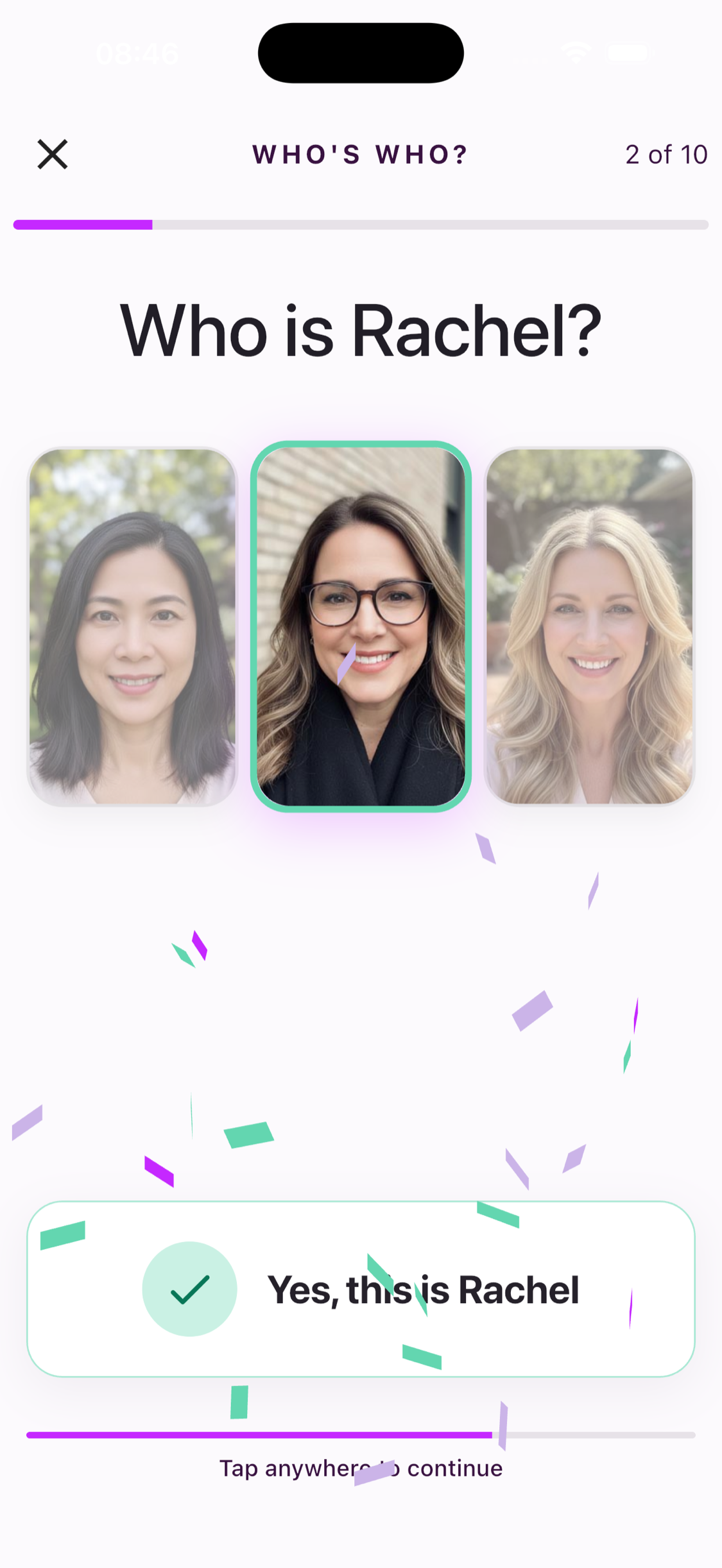
Who's Who turns profile photos from members of your choir into quick ten-question name challenges. Start a round and choose which of three people matches the name.
Everyone in a ready choir can open the game and see the three real choices. Selecting an answer requires an active individual subscription, a choir subscription, or a free trial.
Read seven fun ways to remember names →
Pronouns, If You Want Them
You can now optionally add pronouns to your own profile. Choose a suggested option, enter your own, or leave the field unset. When added, your pronouns can appear alongside your profile, including in Who's Who.
Dina noter, dina markeringar
En helt ny notvisning med personliga anteckningar, snabbare sidbyten, flexibla layouter och smidigt byte mellan sånger.
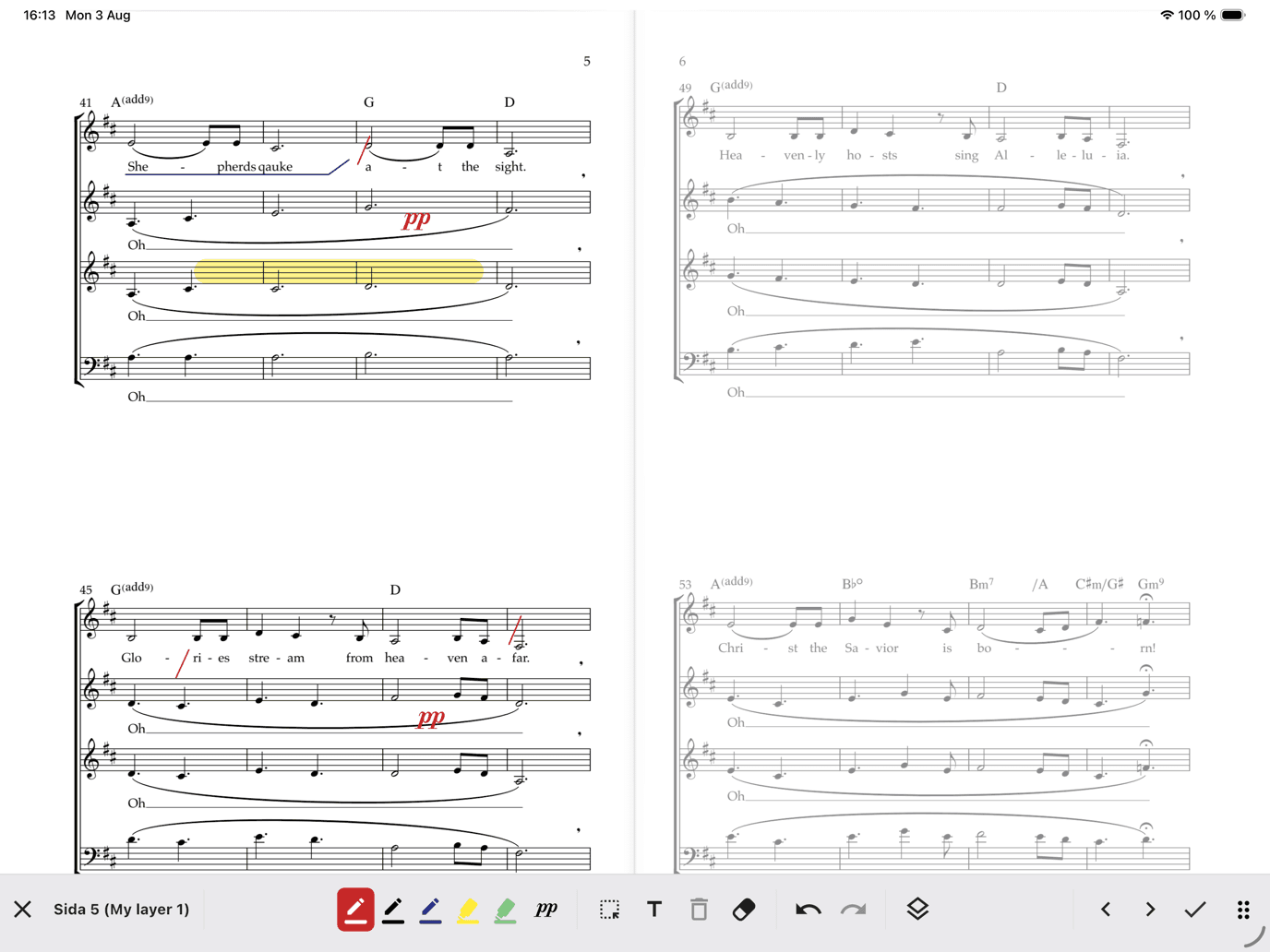
ChoirMate 10 är vår största notuppdatering hittills. Den nya visningen är byggd för repetitioner, egen övning och scenen — och nu kan dina egna anteckningar stanna direkt på noterna.
En notvisning skapad för sångare
Byt sida mjukt, hoppa med sidväljaren, välj en- eller tvåsidig layout och växla mellan sånger i setlistor eller biblioteket utan att stänga visningen. Ljud, piano, sångtext och kommentarer finns fortfarande nära till hands.
Anteckna din egen stämma
Markera andetag, ringa in insatser, framhäv dynamik, skriv text eller placera musiksymboler direkt i noterna. Välj pennor och överstrykningspennor, justera färg och storlek, flytta markeringar, sudda, ångra och gör om.
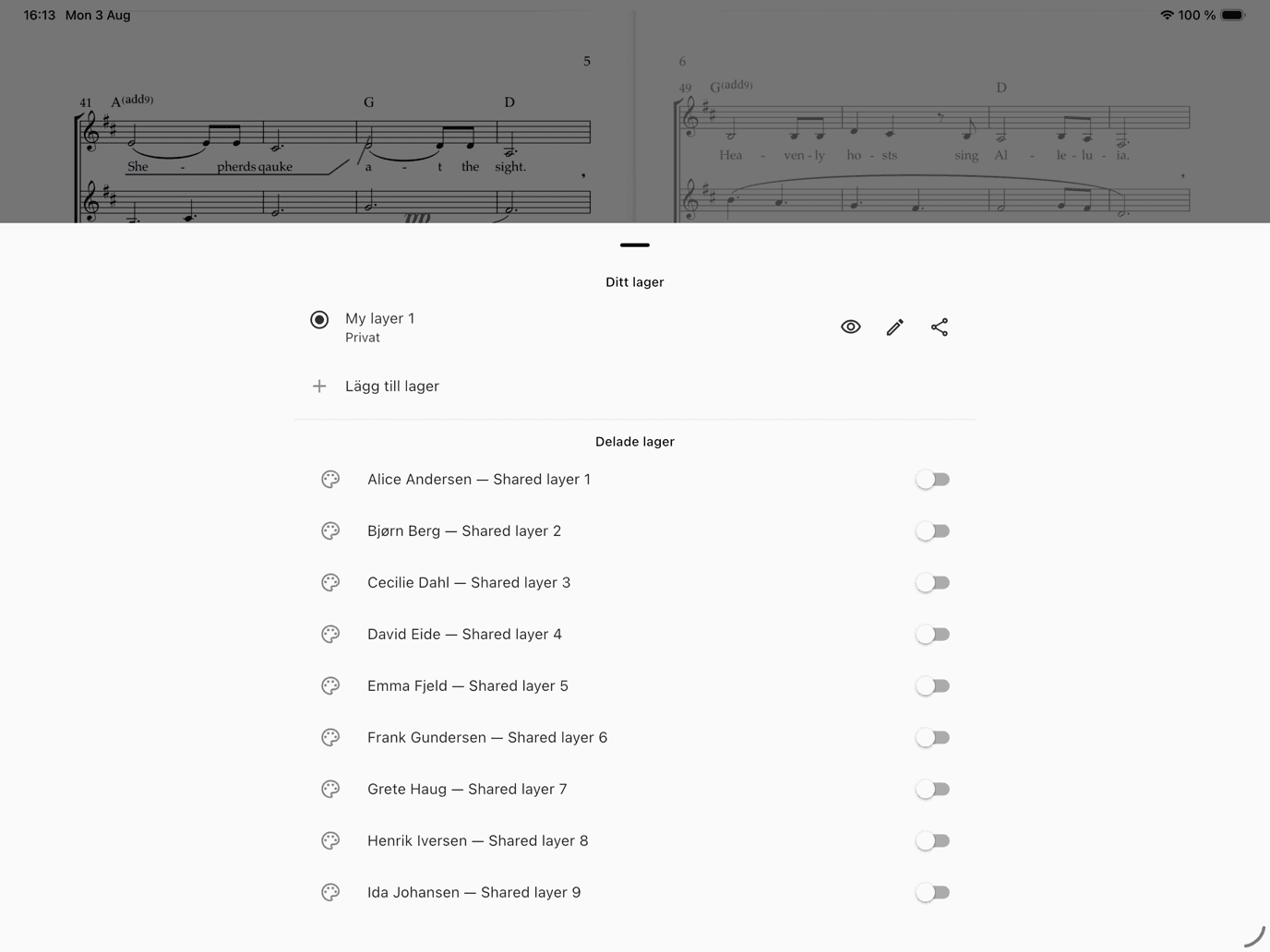
Ditt personliga lager är privat som standard och följer dig mellan dina enheter. Skapa fler lager för olika repetitioner eller syften. Behöriga ledare kan dela ett lager med hela kören, en stämgrupp eller utvalda sångare.
Gratis lanseringsperiod, sedan Premium
Anteckningar är gratis för alla under lanseringsperioden. Därefter ingår sparande med individuellt Premium eller Premium för gruppen. Dina markeringar lagras säkert om åtkomsten upphör och visas igen när Premium aktiveras. Alla kan fortfarande prova verktygen i en kort demo som inte sparas.
Lär dig att anteckna i noter →
Också i ChoirMate 10
- Importera PDF-noter som delas från andra appar
- Växla snabbare mellan senaste sånger och sångbiblioteket
- Bättre offlinelagring och export av annoterade PDF-filer
Promote Your Concerts
Turn any event into a public, shareable concert page with photos, venue info, and ticket links. Plus meet-up times, emergency contacts, and smarter multi-day events.
Version 9.38.0 is about the practical details that make choir life run smoother — led by a brand-new way to fill the seats at your next concert. And while this update focuses on the smaller things, some of the biggest features we have ever built are taking shape behind the scenes. More on that soon.
Public Event Pages
Choir Admins can now turn any event into a beautiful public web page — no choir website required. Add a hero image and a photo gallery, show the venue with a map link, and add ticket links or a "Tickets at the door" badge. Concert runs with several performances are fully supported, each with its own time and, if you need it, its own ticket link.
Publishing takes a minute: open an event of type Concert or Hired performance — those are the types that show the Publish event banner — review the page, which is mostly prefilled from the event, and publish. Then share the link on WhatsApp, SMS, email, or anywhere else, straight from the share screen.

The page updates whenever you edit it, and you can unpublish it at any time. Public event pages are available for groups with a Standard or Premium subscription, or during an active trial.
For a full walkthrough, see the event promotion guide.
Meet-Up Time on Events
Need everyone in place before the downbeat? Events can now carry a separate meet-up time ahead of the official start. Members see both times on the event, so "meet 18:30, start 19:00" no longer has to live in a message thread.
Emergency Contacts
You can now add emergency contacts to your profile — name, phone number, and how they are related to you. If something happens at a rehearsal, a concert, or on tour, the right person can be reached quickly.
Multi-Day Events Stay Visible
Seminar weekends and tours no longer vanish from the upcoming list after day one. Ongoing events now stay visible until they actually end.
That is version 9.38.0. Meanwhile, we are deep into some of the most ambitious features ChoirMate has ever seen — watch this space.
Audio Editor
Trim, split, and delete sections of your audio files right inside the app. The new Audio Editor gives you precise editing with undo support.
Edit Audio Without Leaving the App
The new Audio Editor lets you trim, split, and clean up audio files directly in ChoirMate. No more switching to a separate app to cut out silence at the start or split a long recording into individual songs.

Three Editing Modes
Trim removes everything outside your selection. Drag the handles to mark the section you want to keep, then tap Trim to selection.
Split divides a recording into two parts at the playhead position. Place the playhead where you want the cut, and tap Split here. Both parts are saved as separate files.
Delete removes a selected section and keeps the rest. Useful for cutting out a cough, a break, or a false start in the middle of a take.

Zoom and Undo
Pinch to zoom in for precise edits. Pan left and right to navigate through longer recordings. Every edit can be undone, so you can experiment without worry.
Generated Files
Each edit produces new files that appear below the editor. You can preview them, rename them, or delete ones you do not need before saving. When you save, the files are added to your repertoire.

Premium Feature
The Audio Editor is available with a Premium subscription. Open a song in your repertoire, tap the menu, and select Trim to get started.
Apple Watch & Wear OS
Record your entire choir without leaving your spot. ChoirMate is now on your wrist with Remote Recording Mode, song browsing, and lyrics.
Record Your Choir From Your Wrist
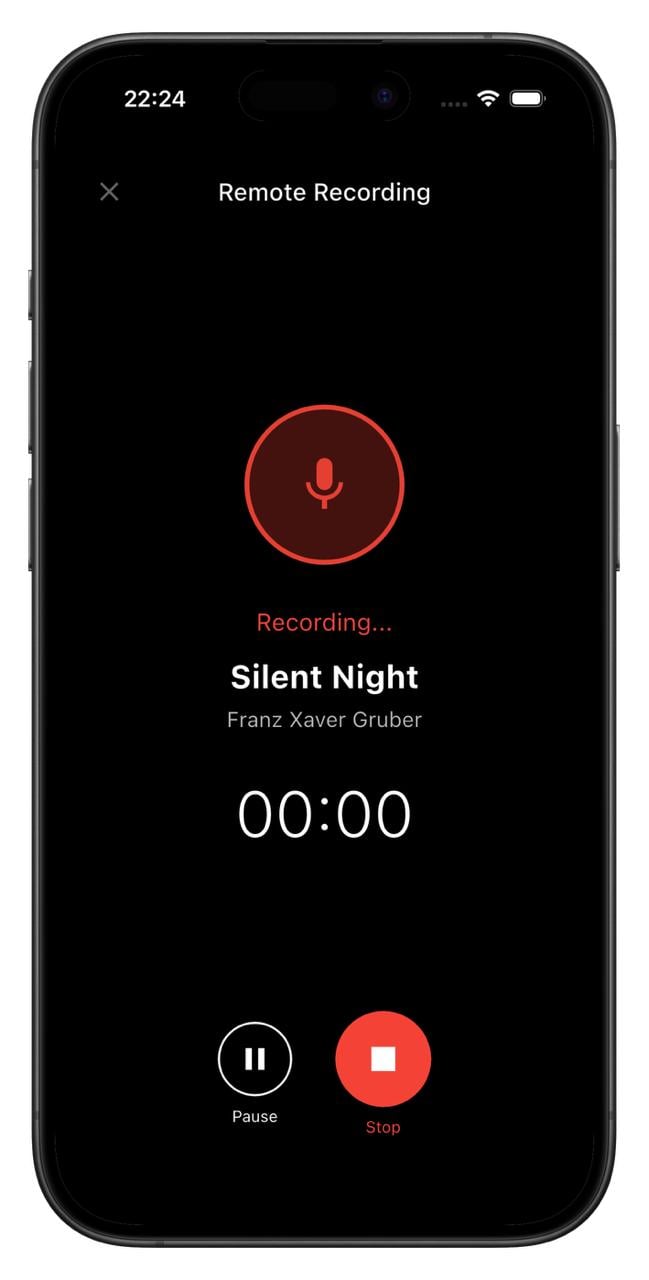
ChoirMate is now available on Apple Watch and Wear OS. The headline feature: Remote Recording Mode lets you turn your phone into a standalone microphone and control the entire recording from your watch.

Remote Recording Mode
Place your phone in the middle of the rehearsal room, walk back to your spot, and start recording from your watch. Pause, resume, or stop whenever you need to. The recording saves directly to the song in your repertoire.
No more running back and forth to press record. You stay with the singers where you belong.
Browse Songs & Read Lyrics
Your watch gives you quick access to your choir's setlists and songs. Tap into any setlist to see the songs, and open a song to read lyrics right on your wrist. Handy for a quick check before going on stage.
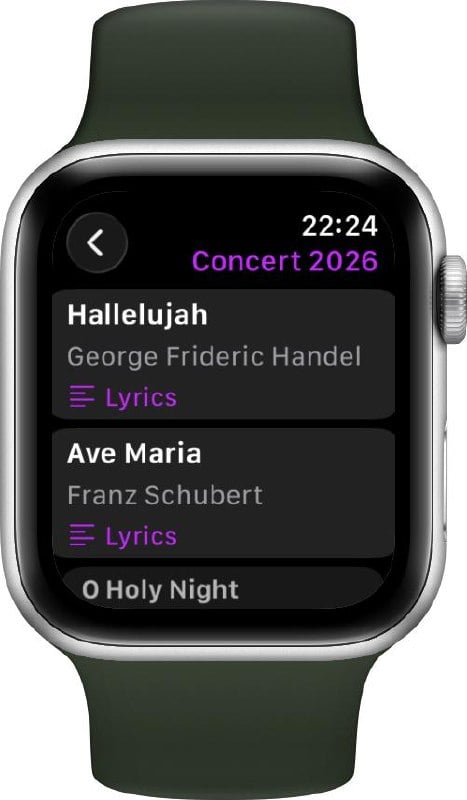
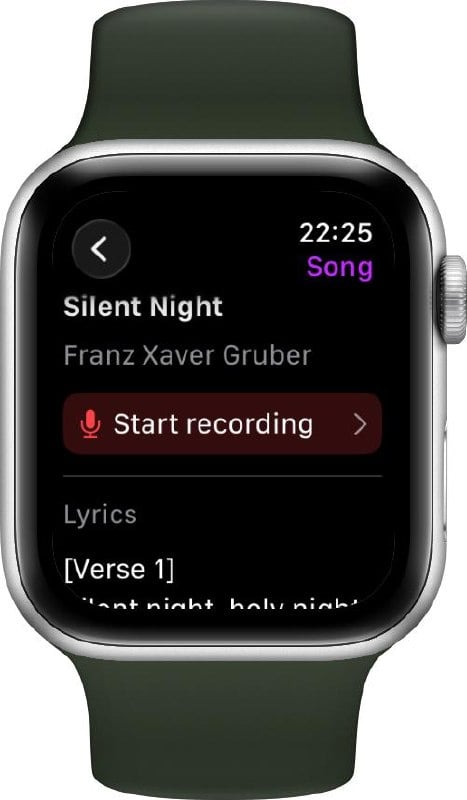
Getting Started
To use ChoirMate on your watch:
- Apple Watch: Open the Watch app on your iPhone, scroll to ChoirMate, and tap Install.
- Wear OS: Download the ChoirMate Wear app from Google Play.
Once installed, the watch connects automatically to ChoirMate on your phone.
Premium
Remote Recording Mode and viewing lyrics on the watch are Premium features. Browsing songs and setlists is available for everyone.
For a full walkthrough, see the smartwatch guide.
Requirements
- Apple Watch: watchOS 10 or later
- Wear OS: Wear OS 4 or later
Personal Lyrics & Event Cancellation
Add your own lyrics to any song for personal reference, and Choir Admins can now cancel and reactivate events with automatic member notifications.
Your Own Lyrics
You can now add your own personal lyrics to any song in the repertoire. Whether you want to jot down phonetic notes, write out translations, or keep your own version of the text, your lyrics are stored privately and only visible to you.
Switch between the choir's official lyrics and your personal version at any time using the view mode toggle in the lyrics panel. Your personal lyrics are also included when generating a PDF of the song.
Adding your own lyrics is available for Premium subscribers. Learn more about lyrics in ChoirMate →
Event Cancellation
Choir Admins can now cancel an event directly from the event management screen. When an event is cancelled, all relevant members are automatically notified, and the event title is updated to clearly show it has been cancelled.
Changed your mind? Cancelled events can be reactivated at any time, and members will be notified again.
Android Auto Integration
Practice your choir music on the go! ChoirMate now works with Android Auto, giving you full playback controls right from your car's dashboard.
We're bringing ChoirMate to Android Auto! If you're an Android user, you can now browse and play your choir's practice tracks, set lists, and audio files directly from your car's infotainment system.
Whether you're driving to rehearsal or just commuting, you can make the most of your time by listening to your parts. The Android Auto interface shows your current queue with song titles, and gives you play/pause, skip, and seek controls right on the dashboard.
Your Practice Lists, Right in the Car
With a ChoirMate Premium subscription, you can build personalized practice lists with exactly the tracks you need to work on. These practice lists are now available directly through Android Auto, so you can queue up your next rehearsal session before you even leave the driveway.
All the Same Features as CarPlay
The Android Auto integration includes the same features as the Apple CarPlay integration released in version 9.31.0:
- Browse set lists and practice lists from the car's display
- Repeat Part mode to loop tricky sections
- Fine-tune loops with ±5-second controls
- Automatic playback from song to song
- Repeat mode (off, repeat all, repeat one)
Event Attachments & PDF Downloads
Attach posts, calendar events, polls, or files directly to an event. Plus, PDFs shared in messages can now be downloaded.
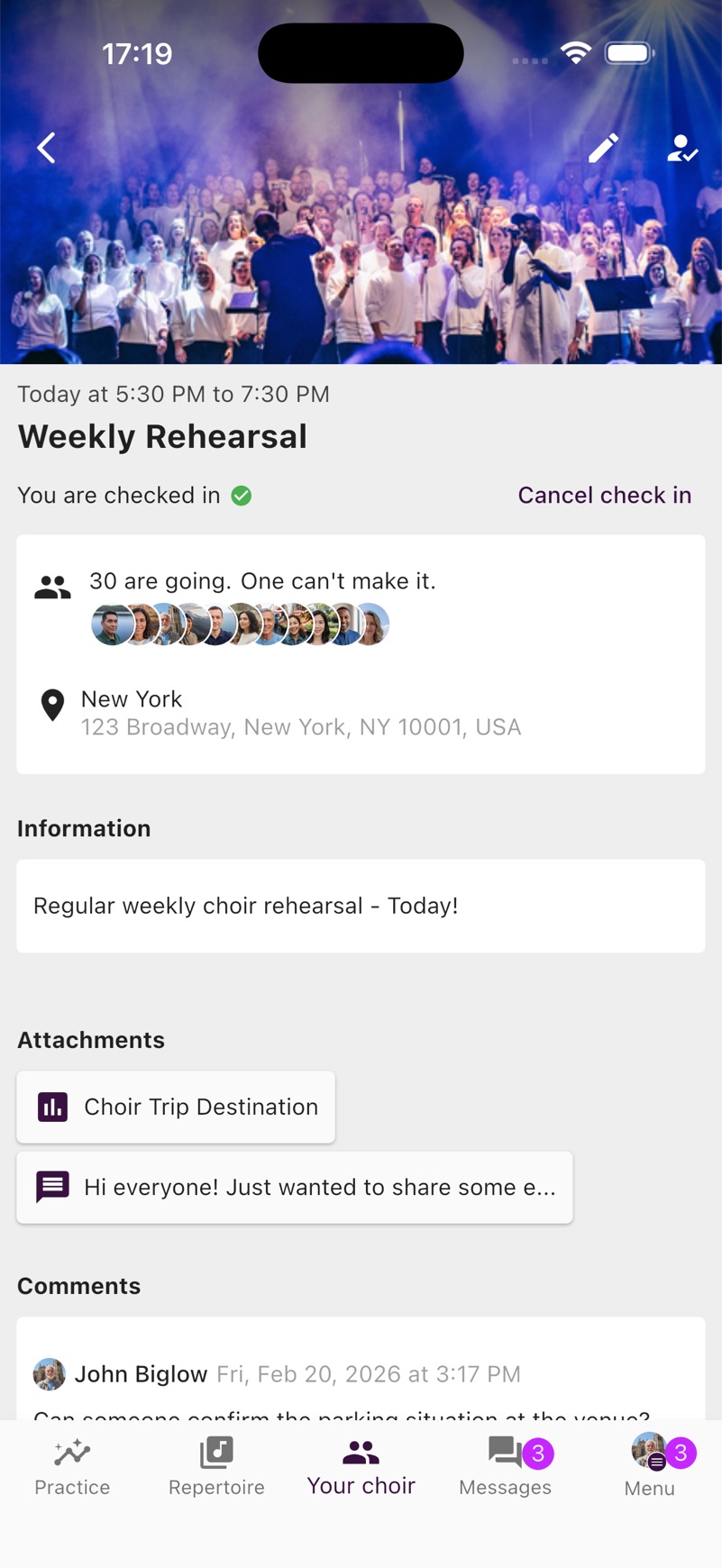
Events can now have content attached to them. Attach posts from the choir leadership, calendar events, polls, or files from the Documents and Links library directly to an event, so your members have everything they need in one place.
Standard subscriptions can attach up to 3 items per event, while Premium allows up to 10.
Additionally, PDFs shared in messages can now be downloaded and shared directly from the viewer, making it easy to save documents to your device.
This release also includes stability improvements to the Apple CarPlay integration.
Apple CarPlay Integration
Practice your choir music on the go! ChoirMate now works with Apple CarPlay, giving you full playback controls right from your car's dashboard.
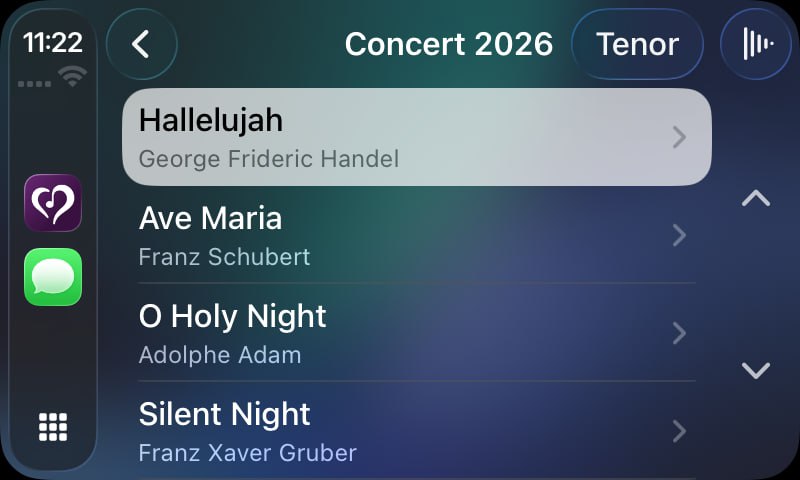
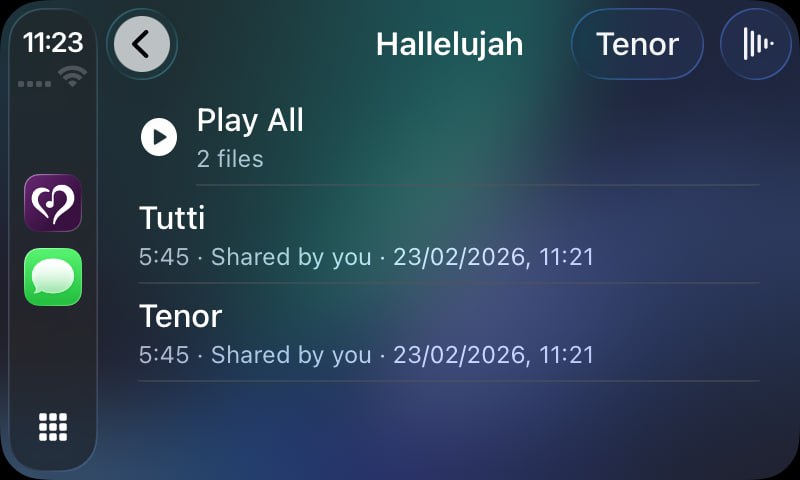
We're excited to bring ChoirMate to your car! With Apple CarPlay support, you can now browse and play your choir's practice tracks, set lists, and audio files directly from your car's infotainment system.
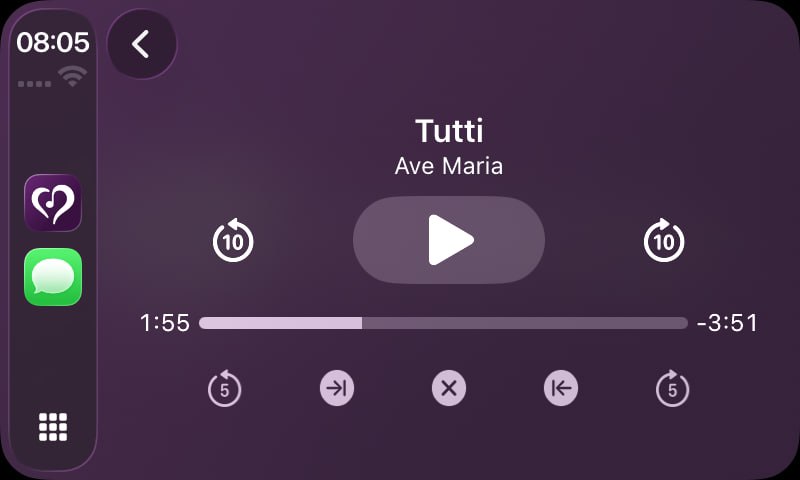
Whether you're driving to rehearsal or just commuting, you can make the most of your time by listening to your parts. The CarPlay interface shows your current queue with song titles, and gives you play/pause, skip, and seek controls right on the dashboard.
Repeat Part Mode on CarPlay
Need to nail that tricky section? The Repeat Part mode is fully available on CarPlay too. Loop any section of a track and listen to it over and over until it sticks, all without touching your phone.
Your Practice Lists, Right in the Car
With a ChoirMate Premium subscription, you can build personalized practice lists with exactly the tracks you need to work on. These practice lists are now available directly through CarPlay, so you can queue up your next rehearsal session before you even leave the driveway.
Combined with the lock screen and Control Center integration, ChoirMate's audio player now works seamlessly across all your Apple devices and contexts.
Mer kommer snart...