

Choir Attendance Tracking: A Practical System for Rehearsals and Concerts
Learn how to track choir attendance with a shared calendar, simple RSVPs, targeted reminders, on-site check-in, and useful attendance reports.

A reliable choir attendance system has five parts: schedule every rehearsal and concert in one calendar, collect a simple RSVP, remind only the people who have not answered, confirm who actually arrives, and review the final report afterward. The goal is better planning and member care—not policing singers.
Attendance sounds like a small administrative detail until you are planning a rehearsal without knowing whether you will have four tenors or fourteen. The same uncertainty affects seating, music folders, carpools, venue capacity, concert lineups, and even basic safety at a crowded event.
Many choirs solve pieces of the problem with a spreadsheet, an online form, a paper sign-in sheet, and a message thread. Each tool can work. The trouble is that the schedule, the RSVP, the check-in, and the final record end up in different places. Someone still has to reconcile them after every rehearsal.
This guide lays out a connected workflow and uses ChoirMate as a practical example of a choir attendance app. You can apply the same principles whether your ensemble is a community choir, church choir, school chorus, or auditioned chamber group.
Why track choir attendance in the first place?
Good attendance data answers operational questions. Will every section be represented? Is this the rehearsal where you should work on balance, choreography, or a difficult divisi? Do you need more chairs, extra folders, or a different room? Who has missed several rehearsals and may need help catching up?
It can also reveal when a member may need a friendly check-in. A sudden pattern of absence is not automatically a commitment problem. It may signal illness, a family situation, transportation trouble, or that the member no longer feels connected to the group.
1. Start with one shared calendar
Attendance begins before anyone responds. Publish rehearsals, sectionals, dress rehearsals, concerts, call times, and social events in one shared choir calendar. Add dates as early as you reasonably can, especially for performances and extra rehearsals.
Each event should have a clear title, date, start and end time, location, and enough context for a singer to make a decision. For a concert, separate the call time from the public start time. For an optional sectional, say which sections are invited. A precise event produces a more reliable RSVP.

ChoirMate stores rehearsals and concerts alongside the music and information connected to them. Directors can also work from the web version when a larger screen is more convenient for scheduling and rehearsal planning.
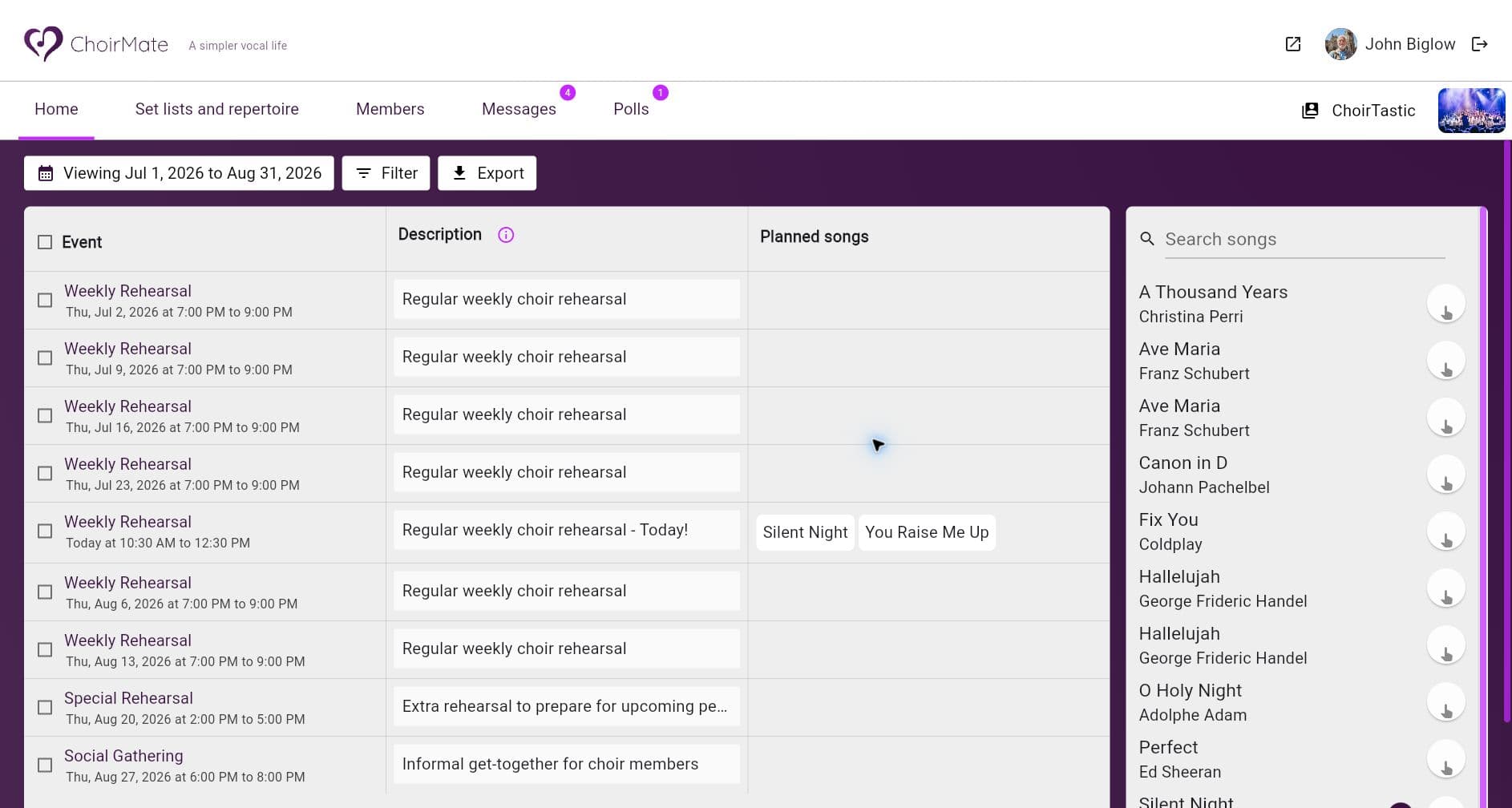
If singers use their personal calendars heavily, calendar synchronization can reduce missed dates. ChoirMate offers calendar synchronization as an optional feature.
2. Ask for the smallest useful RSVP
A two-choice response—attending or not attending—is enough for most rehearsals. It is fast on a phone, easy to understand, and does not turn every event into a survey. If your choir needs an absence reason, make it optional unless there is a clear reason to require it, and keep that note private to the people who genuinely need it.

ChoirMate supports two common models. In must respond mode, every invited singer begins as unanswered. In attending by default mode, members only need to report when they cannot come. The first provides clearer planning data; the second creates less administrative work for choirs with very stable attendance.
Make it easy to change an answer
Plans change. Members should be able to update their RSVP without asking an administrator to fix it for them. Treat the latest response as the best available planning signal, then use check-in to record who actually attended.
3. Remind only the people who have not answered
Repeated whole-choir reminders train people to ignore choir notifications. A better system filters the roster to nonresponders and sends one clear request to that smaller group. People who already answered should not have to process the same message again.
In ChoirMate, a director can open the unanswered list, choose the recipients, edit the message, and send the reminder. A useful message says what action is needed and why: “Please update your RSVP so we can plan the rehearsal.”

RSVP reminders and check-in reminders solve different problems. ChoirMate lets directors send a targeted RSVP reminder manually. It can also send automatic notifications around the start and end of an event when check-in is enabled. Keep both settings intentional so the choir gets useful prompts rather than background noise.
4. Confirm attendance when people arrive
An RSVP records intention, not presence. Plans change, people get sick, and someone who expected to attend may never reach the venue. For accurate records, add a lightweight check-in during the event.
Member self check-in is the lowest-effort option. A singer opens the rehearsal and taps Check in. This works well when members already use the choir app and phones are acceptable at arrival.

Self check-in does not have to be your only method. An administrator can correct a missed check-in, and a section leader can record attendance for their own section. The best workflow is the one that creates an accurate record without delaying the start of rehearsal.
Who should take attendance?
| Method | Works best when | Watch for |
|---|---|---|
| Self check-in | Members already use the app and arrive independently | Forgotten taps and late arrivals |
| Section leaders | The choir is large and each leader knows their section | Clear permissions and substitutes |
| Administrator or director | The choir is small or the record has formal consequences | One person becoming a bottleneck |
| Hybrid | Most members self check in and a leader fixes exceptions | A clear final-review owner |
ChoirMate permissions support these models without giving every helper full control of the choir. Administrators can be allowed to manage everyone or only their own voice group. Editors—often used for delegated roles such as section leaders—can be limited to their section or prevented from viewing attendance entirely. Members can be allowed to maintain only their own status.
5. Review attendance after the event
The record becomes useful after the rehearsal. Review obvious exceptions while they are still fresh: the person who arrived late, the singer who forgot to check in, or the section leader who marked the wrong name. Then let the report settle into history.
ChoirMate creates an attendance report automatically a few hours after an event ends. Administrators can still correct the report later. For a single event, the participant list can be exported to an Excel file. For longer-term analysis, the attendance export can be filtered by date range, event type, the full choir, or selected voice sections, then downloaded or delivered by email.

An export is helpful for concert eligibility rules, grant or board reporting, membership reviews, and spotting long-term patterns. Do not reduce the spreadsheet to a ranking of “good” and “bad” singers. Look for information that leads to a useful action: a section that needs a catch-up rehearsal, dates that consistently conflict with members, or someone who may appreciate a personal message.
A lightweight attendance policy
The technology works best when the choir knows the social rules. A simple policy can fit in five lines:
- Respond to concert invitations as soon as you know your plans.
- Update your response when your plans change; accuracy matters more than keeping the original answer.
- Check in when you arrive if the event asks you to do so.
- Share only as much absence information as you are comfortable sharing.
- Attendance records are used for planning, safety, readiness, and member support.
If attendance affects performance eligibility, explain the rule before the season begins and provide a human review for illness, caregiving, work, disability, transportation, and other real-life circumstances. Software can show the record; it should not make the judgment.
Common attendance-tracking mistakes
-
Using too many systems. When the calendar is in one place, the RSVP in another, and check-in on paper, the choir administrator becomes the integration layer.
-
Sending reminders to everyone. Filter to the people who still need to act.
-
Confusing RSVP with attendance. Keep intended attendance and actual check-in as separate stages.
-
Collecting detailed absence explanations by default. Ask only when the information serves a clear purpose, and limit who can see it.
-
Creating a bottleneck. Give section leaders limited attendance permissions when one administrator cannot check in a large choir quickly.
-
Keeping data without reviewing it. Decide which patterns matter and when someone will look at them.
Frequently asked questions
How do you keep track of choir attendance?
Use one shared calendar, collect a simple RSVP before each event, remind only members who have not responded, confirm arrivals on site, and review the final attendance report afterward. Keeping the five stages connected prevents manual reconciliation later.
Should choir attendance be mandatory?
That depends on the choir and the commitment it offers members. An auditioned ensemble preparing complex repertoire may need a clear minimum. A drop-in community choir may value flexibility more. In either case, publish the expectation in advance and handle personal circumstances with discretion.
Who should take attendance at rehearsal?
Small choirs can let members check themselves in. Larger choirs can delegate attendance to section leaders, while an administrator or choir director retains the ability to make corrections. A hybrid model usually creates the least work.
What should a choir attendance report contain?
Include the event date, member name, section or voice part, and final attendance status. Add an optional private absence note only when it is genuinely useful. The report should be exportable for the date range and event types the choir needs.
Make attendance useful
Choir attendance tracking should remove uncertainty, not create anxiety. Give singers early notice, make the response quick, send fewer and better reminders, and keep the final check-in flexible. The result is better rehearsal planning and a clearer picture of how the choir is doing.
Good choir management software connects those steps without making the process feel bureaucratic. ChoirMate brings the calendar, RSVP, reminders, check-in, permissions, reports, and Excel exports into the same choir app, so the attendance record is useful before, during, and after every event.