

ChoirMate 10.5.0
Keep your choir’s conversations together
Search earlier messages, share documents, quote replies and use @mentions in ChoirMate 10.5.0.
A rehearsal time, a question about the score, the PDF someone shared last week. Choir conversations move quickly. ChoirMate 10.5.0 makes it easier to find the useful details and keep replies in context.
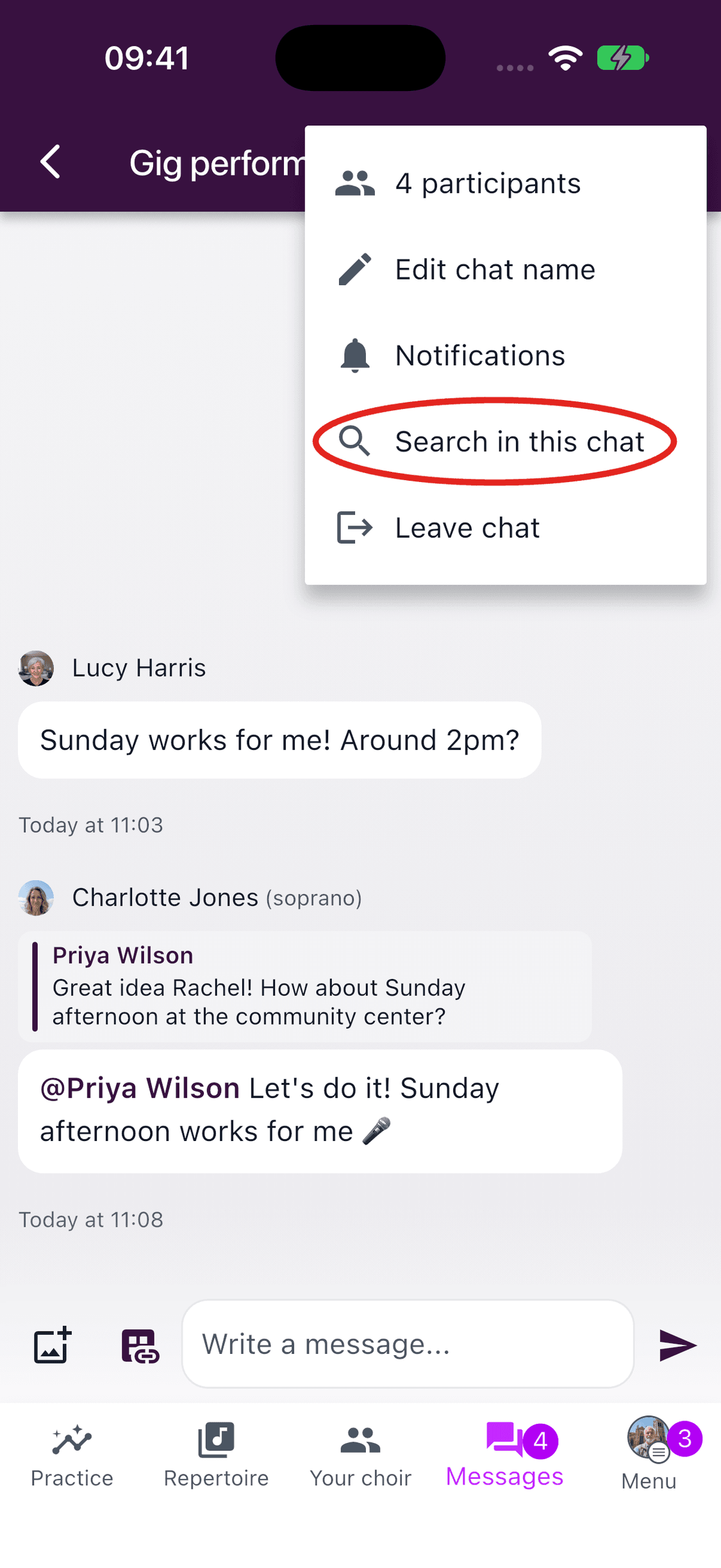
Find the message you need
Use search to find earlier choir messages, or search within a conversation. Filters help narrow the results. Open a result to return to the relevant message instead of scrolling through the whole conversation.
Share the file beside the conversation
Send PDFs, documents and spreadsheets directly in a conversation. Choose the file option from the message’s media menu, select the document and send it with your message.
A rehearsal plan or concert document can stay beside the discussion it belongs to. You can still use the choir’s file storage when you want to organise files in folders.
Reply with context
When several topics are being discussed, a short answer can be hard to place. Press and hold a message and choose Reply to include a quote. Everyone can see which message you are answering.
Make it clear who you mean
Type @ and choose a member from the suggestions to mention them. This makes a question or response easier to follow without relying on someone recognising a first name in a busy conversation.
Open Messages in the updated mobile app to try the changes.